



GOOGLE WORKSPACE VS. MICROSOFT 365 APPLICATION EQUIVALENTS
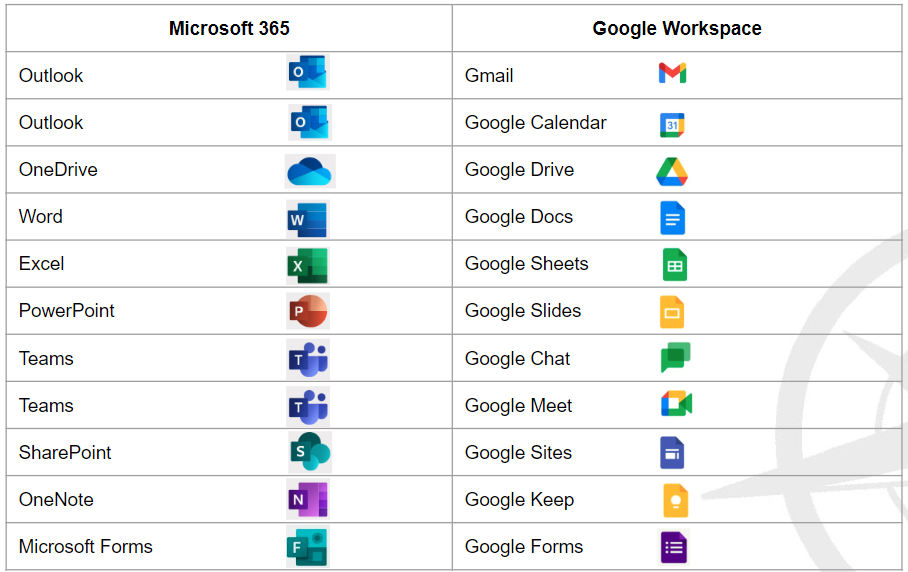
WHAT DOES NOT MIGRATE FROM GOOGLE WORKSPACE TO MICROSOFT 365?
|
Item |
Description |
Solution |
|
Gmail filters and routing rules |
Filters you have applied in your Gmail settings will need to be recreated as rules in Outlook |
Recreate rules in Outlook to match your filters. Staff will need to take note of their filters in Gmail prior to migration. |
|
Google Meet Links |
Google Meet links in calendar events or embedded in files or emails will break during the migration to Microsoft 365. Zoom and Teams links will remain intact. |
Staff will replace their own calendar events with Microsoft Teams or Zoom links |
|
Collaborative Inbox Configurations |
If you are currently using a collaborative inbox (PepperPointe IT will reach out to you directly if you’re affected) |
Collaborative inboxes will become Microsoft 365 Shared Mailboxes |
|
Calendar event colors |
Custom colors for events will not migrate to Microsoft Outlook |
Staff are responsible for customizing their Outlook calendar colors after migration |
|
External Sharing |
All Google Drive files shared with an account outside of the organization or access set to “anyone with the link” will no longer be accessible to those accounts outside our organization |
Staff are responsible for identifying and notifying [email protected] of any files shared externally that will need to be reshared using our new secure file sharing solution, MOVEit Transfer. |
|
Google Drive Shortcuts |
Shortcuts to files and folders added to users Google Drive will break during migration. |
Staff should take note of important or frequently used files that are accessed via shortcuts in their Google Drive. Staff are responsible for identifying the location of the file using the file details information so shortcuts can be recreated if needed. |
|
Google Sites |
Group Resource Center sites cannot be migrated. |
Resource Centers will be rebuilt and accessible via Microsoft SharePoint. |
|
Hyperlinks and embedded videos/media in Google documents |
Links to other files, Drive documents, Google documents, Google Sheets, Google Slides, and Drive links will break within any |
Staff to identify files that rely on these links or those that will need to be rebuilt with valid links in Microsoft Word, Excel, PowerPoint, etc. Staff to work with PepperPointe IT to address affected files prior to migration. |
|
Google Forms |
Google Forms do not migrate. |
Google Forms will need to be rebuilt in Microsoft Forms prior to migration. Staff will identify Google Forms in use that will need to be used after migration and download Google Form responses into Google Sheets to be converted into Microsoft Excel format. Staff to work with PepperPointe IT to rebuild forms. |
|
Google Chrome Profile and Password syncs |
Chrome profiles will break when our Google Workspace accounts deactivate. Profiles store our passwords, shortcuts, bookmarks, and favorite sites. Profiles will need to be recreated if desired. Microsoft Edge is the native browser for Microsoft, but users will still be able to use Google Chrome. |
Staff will follow instructions to export Google Chrome passwords and bookmarks prior to migration to then be imported into Microsoft Edge. Staff will be able to import passwords and bookmarks into their new Chrome profile after migration that is synced with their Microsoft account. |
|
Email Signatures |
Email signatures do not migrate to Outlook. |
Staff will follow instructions provided by PepperPointe IT to recreate email signatures in Outlook. |
|
Cloud 9 Email Accounts |
Email addresses used in Cloud 9 will need updated in Cloud 9 after migration |
PepperPointe IT will work with affected users and practices to update mail settings on the day of migration to ensure no interruption of operations in Cloud 9. |
|
Google Chrome desktop shortcuts |
Shortcuts on user’s desktops to Chrome websites will need to be recreated |
PepperPointe IT will recreate desktop shortcuts for affected users |
|
2 Factor Authentication/Multi-Factor Authentication |
Google’s 2 step verification methods do not transfer to your Microsoft account. MFA will need to be reconfigured in your Microsoft account after migration |
PepperPointe IT will provide a user guide on setting up MFA. Staff will follow instructions on January 3, 2024 or when they first log in to their Microsoft account. |
WHAT DOES MIGRATE FROM GOOGLE WORKSPACE TO MICROSOFT 365?
|
Items |
Details |
Notes |
|
Emails |
All email history will be available in Outlook. Your Gmail labels will become folders in Outlook available for your use on day 1. |
Having multiple labels on one email will duplicate the email in your inbox. This will increase the size of your inbox, which may affect the type of license you require for your inbox size. If you use multiple labels on the same email thread, please email [email protected] for further information. |
|
Calendar Events |
All calendar events will be available in your Outlook calendar. Guests, rooms, and details should all carry over to Outlook. |
Calendar colors do not migrate. You can customize your calendar colors in Outlook after migration is complete. Zoom meeting should remain intact during migration. It is encouraged that you note any meetings with video conferencing links ahead of migration and ensure link is functional after migration is complete. |
|
Google Drive |
Files and folders in your “My Drive” will be available in OneDrive and will mirror your current organization. |
Shortcuts do not migrate. You will access Google Shared Drives from SharePoint. |
|
Google Shared Drives |
Files and folders currently in Google Shared Drives will be available in a SharePoint site with the same name as the current Drive. |
Access will need to be granted upon migration. PepperPointe IT will be resharing all items from SharePoint sites with appropriate users. If you do not have access to an item, please reach out to [email protected].
Items shared externally will not longer be accessible to those external accounts. Contact [email protected] if you require assistance. |
|
Google Docs |
Converted to Microsoft Word files |
You may find minor formatting differences as a result of file format conversion. These should be simple fixes, but if you require assistance please refer to support resources or email [email protected]. |
|
Google Sheets |
Converted to Microsoft Excel |
You may find minor formatting differences as a result of file format conversion. These should be simple fixes, but if you require assistance please refer to support resources or email [email protected].
Files with complex formulas, links, or other advanced formatting may be broken. If you require assistance reformatting or correcting the document please email [email protected]. |
|
Google Slides |
Converted to Microsoft PowerPoint |
Some links may be broken. Reach out to your PepperPointe contact for access to the content if needed. |
A Downloadable PDF is Available Below.


